How I built a $5/month AI lead bot that replaced a $99/month SaaS tool
Project: Worksy HRMS - Automated Lead Qualification with n8n
Role: Automation and AI Workflow Design
Timeline: Q1 2026
At Worksy, lead qualification used to be a manual, slow process. Here is how it worked:
- A user fills out a demo request form
- Sharifah or Hanan (my team members) gets notified
- They call or text the lead to find an available demo slot
- They manually check 8 different sales calendars
- They confirm the time with the lead
The problem? We were losing interested prospects because it took up to 1 day to get back to them. Meanwhile, leads just wanted to know available slots right away.
Management asked me to find a way to automate this. Here is how I built a custom AI agent that cuts response time from hours to 5 minutes, costs less than $5 per month, and never hallucinates.
The Problem with Off-The-Shelf Tools
I first researched popular WhatsApp automation tools and shortlisted to two tools. Here is what I found:
| Tool | Cost | Why I Rejected It |
|---|---|---|
| Wabot | RM130/month | AI is non deterministic. It would say a slot was booked but actually hallucinated the time. |
| Respond.io | $99/month | Same issue. Plus, we could only use 1 AI agent. Our workflow needed multiple specialized agents. |
Both tools were brittle. If the AI makes a mistake or hallucinates, we lose a lead or double book a calendar. In my use case, one AI is not gonna make it. Not worth the risk.
The Complexity We Had to Solve
Our requirements were not simple:
- 8 salespeople, each with their own Google Calendar
- Each salesperson handles different company sizes (50+ HC, 100+ HC, 200+ HC)
- Leads might want to book new, reschedule, or ask complex questions
- Users send burst messages (multiple texts at once) but expect one reply
- Humans need to jump in when the AI gets stuck
A simple chatbot would not cut it. I needed a system that was smart, reliable, and cheap. I need the AI to answer queries without sounding robotic but I also need deterministic logic to prevent it from making things up.
My Solution: Self-Hosted, Modular, and Deterministic
I decided to build everything from scratch. Here is the tech stack I used:
| Component | Tool | Cost | Why I Chose It |
|---|---|---|---|
| Server | Hetzner VPS | $3.99/month | Cheap, reliable, full control |
| OS and Deployment | Linux + Dokploy | Free | Easy to manage containers and services |
| WhatsApp API | Evolution API | Free, self-hosted | No restrictions like official WhatsApp API, full control |
| Workflow Engine | n8n | Free, self-hosted | Visual builder, supports complex logic, unlimited AI agents |
| AI Brain | Qwen via OpenRouter | ~$0.001 per conversation | Cheap, good performance, I control the temperature and prompts |
| Data Layer | Google Sheets | Free | Simple, familiar to the team, easy to audit |
| Message Buffer | Redis | Free | Handles burst messages by queuing and concatenating them |
Total monthly cost: Under $5. Compared to $99 for Respond.io, this is a massive saving. Plus, now I have access to 3 different AI agents - and I can scale it to as many as I want. All while paying the same VPS server fee of $3.99 per month.
The AI Workflow: Three Specialized Agents
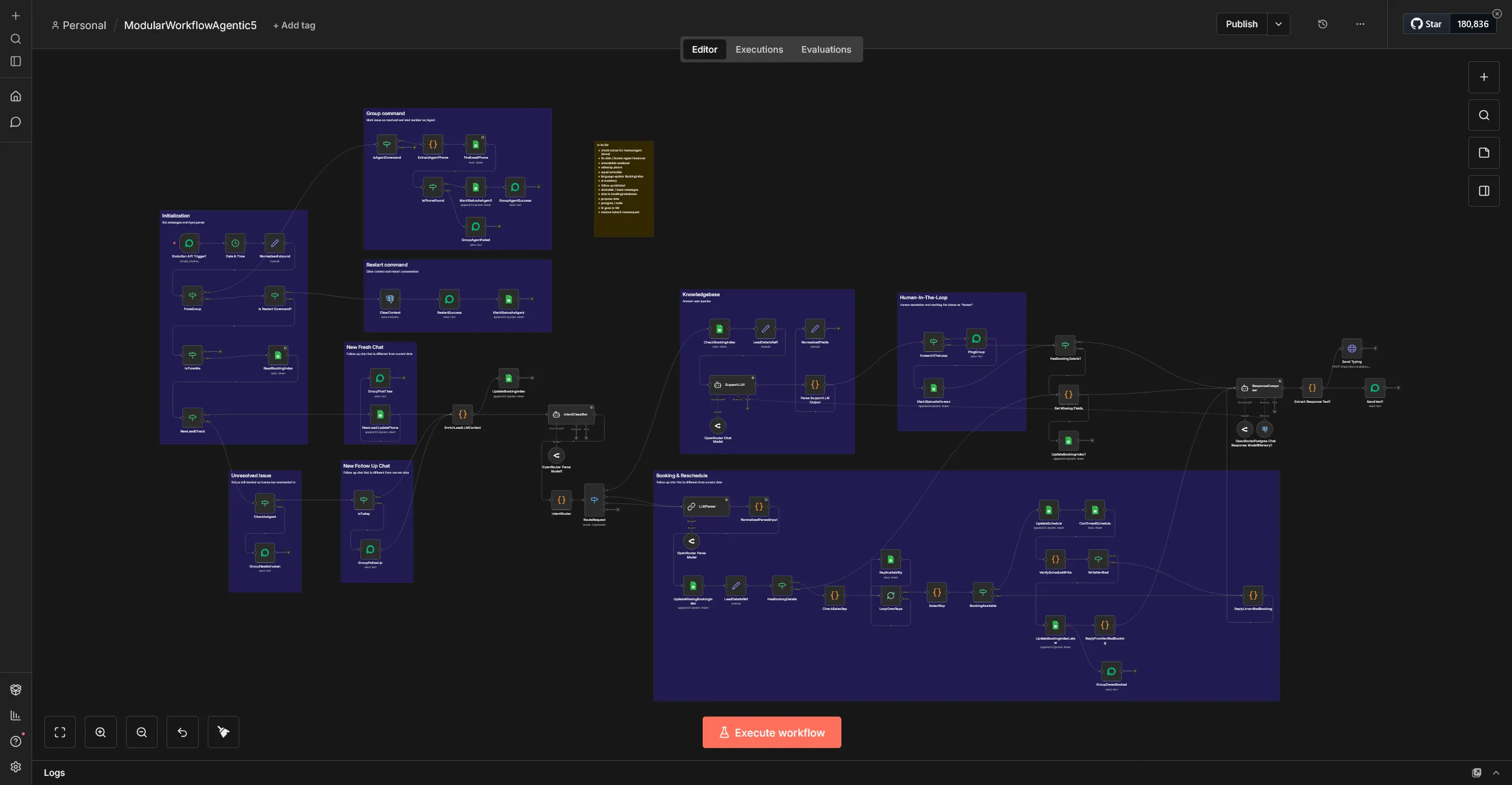
Instead of one AI trying to do everything, I split the work into three specialized agents. Each has a clear job and strict rules. This is how it looks like.
Yeah, I know - that is a lot of nodes! Indeed it is and it's a fun learning process. I'll explain more why the nodes are needed.
| Agent | Role | Key Setting |
|---|---|---|
| Parser | Takes the user message and extracts lead details into clean JSON | Temperature set to 0. No creativity, just facts. |
| Intent Classifier | Decides: Is this a simple question, a complex query, a reschedule, or a new booking? | Uses clear rules and examples to avoid mistakes. |
| Composer | Writes the final reply to the user, pulls calendar data, and confirms slots | Only speaks after receiving clean data from the first two agents. |
This modular design means if one part fails, the others can still work. It also makes debugging easy. To avoid hallucinations and achieve deterministic outcome, I also had to create several custom code snippets.
Solving the Hard Problems
Problem 1: Burst Messages
Users do not wait. They send 3 or 4 messages in a row and expect one reply. n8n can only handle one message at a time.
My fix: I added Redis as a temporary cache. It polls incoming messages, waits a short timer, and concatenates them into one block before passing to the AI. The user gets one clear reply instead of multiple fragmented ones.
Problem 2: Calendar Logic and Cascading
Each salesperson has their own calendar and company size rules. If one is busy, the lead should go to the next available rep.
My fix: I wrote custom code in n8n that:
- Checks Google Calendar for free slots
- Matches the lead company size to the right salesperson
- Cascades to the next rep if the first is occupied
- Writes the booking to Google Sheets for audit
No hallucination, it's just pure deterministic logic. This actually helped in token savings as well. Compared to giving the AI freedom to do tool calls, executing Javascript is 80% more token efficient.
Problem 3: Human in the Loop
Sometimes the AI cannot answer a complex question. Humans need to step in which is why Sharifah and Hanan have access to the AI Whatsapp number in their own laptops.
My fix: I created a private WhatsApp group with me, the AI agent, Sharifah, and Hanan.
- When a new lead messages, the AI posts a notification in the group
- If the AI is stuck, it pings the group for help
- Sharifah or Hanan can jump into WhatsApp Web to take over the chat
- Once resolved, they send a command like
/agent <phone number>to hand the conversation back to the AI
This keeps the AI helpful but never leaves the lead stranded.
The Results
| Metric | Before (Manual) | After (AI Automation) |
|---|---|---|
| Response Time | Up to 24 hours | Under 5 minutes |
| Cost Per Conversation | Staff time (high) | ~$0.001 via OpenRouter |
| Monthly Tool Cost | $99 (Respond.io quote) | Under $5 (self-hosted) |
| Lead Drop-off | High due to slow reply | Significantly reduced |
| Human Time Saved | 0 hours | Sharifah and Hanan now focus on closing, not scheduling |
Real cost example: Early testing shows that for every 30 demos booked, we only spend around $0.50 in OpenRouter credit. That is less than 2 cents per lead.
What This Says About My Work
This project shows that I do not just use tools. I build systems that solve real business problems.
My approach:
- Start with the problem, not the tool. Automation should serve people, not replace them.
- Break complex workflows into small, testable pieces. Three AI agents are better than one confused one.
- Use code to add control. Redis for messages, custom logic for calendars, strict prompts for AI.
- Keep humans in the loop. AI handles the routine, people handle the exceptions.
- Optimize for cost and reliability. Self-hosting saved us 95 percent on tooling with zero downtime.
I help companies move from manual, slow processes to fast, reliable automation. And I do it without breaking the budget or the user experience.